System Breakdown
Hardware specifications for the 2026 Badger 2350 badge.
Badge Image
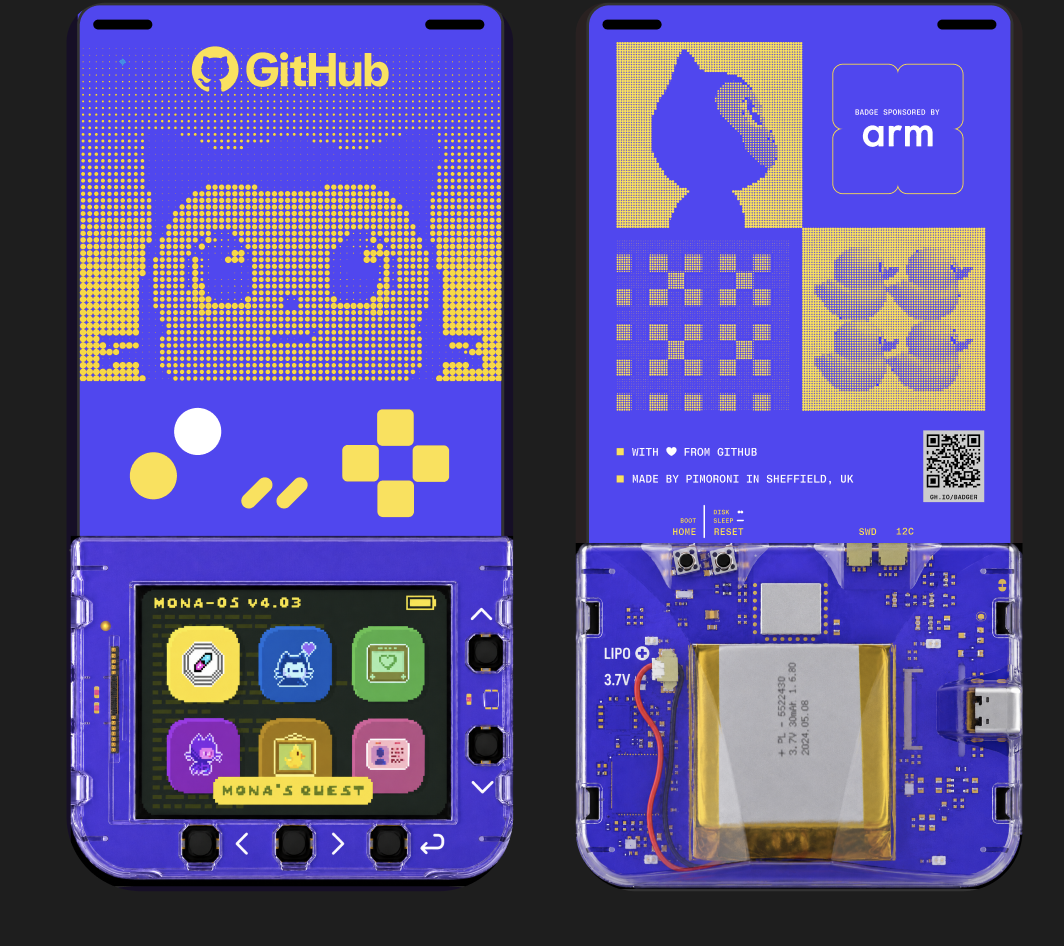
Specifications
Processor and memory
- Processor
- RP2350 dual-core ARM Cortex-M33 @ 200MHz
- Memory
- 512kB SRAM
- Storage
- 16MB QSPI XiP flash
Display
- Screen
- 320x240 full-color IPS display
- Backlight
- 4-zone LED backlight
Wireless
- WiFi
- 2.4GHz WiFi
- Bluetooth
- Bluetooth 5
Power
- Battery
- 1000mAh rechargeable battery
- Runtime
- Up to 8 hours
- Monitoring
- Battery voltage monitoring and charge status
Controls and sensors
- Buttons
- Five front-facing buttons
- Motion
- Accelerometer
- Touch
- 8 capacitive touch sensors
Ports and programming
- USB-C
- Charging and programming
- Expansion and debug
- Qw/ST and SWD ports for accessories and debugging
- Board controls
- RESET / BOOTSEL buttons
Infrared
- Hardware
- IR receiver and transmitter
- Uses
- Beacon hunting and remote control
Case
- Material
- Durable polycarbonate case
- Attachment
- Lanyard fixings